Steady State Sources
1. Overview
Used when performing a steady-state simulation. This component provides a steady-state (DC) source that can supply either a fixed voltage or current between its two terminals. It is an ideal component, meaning it maintains a constant output regardless of the connected load.
1.1. DC Voltage Source
Provides a fixed potential difference across its terminals with zero internal resistance, described by:
1.2. DC Current Source
Provides a fixed current to the circuit with infinite internal resistance, described by:
2. Parameters
| Name | Description | Unit |
|---|---|---|
Name | A unique identifier for the component. | - |
Values | A list of voltage or current points or sweeps for the DC source. | or |
3. Usage Instructions
For instructions on adding a component to the simulation circuit, click here.
The DC Source Properties properties window window allows you to configure the parameters for a DC source.
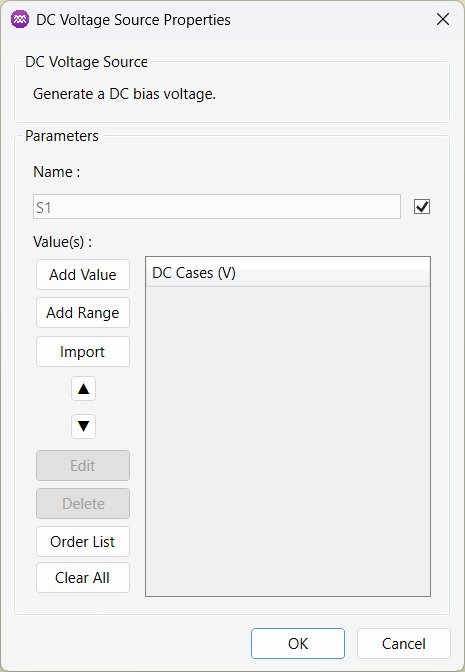
Values can be defined either as individual points by selecting Specified or as ranges of equally spaced points by selecting Sweep.
The steps below show how to configure the component effectively.
3.1. Adding Entries
3.1.1. Adding Points (Specified selected)
- Click
Add Valueto add individual points. - Alternatively, you can
Importa list of values from an external CSV file.
3.1.2. Adding Sweeps (Sweep selected)
- Click
Add Sweepto add a range.
3.2. Organising Entries
- Use the
▲and▼buttons to reorder the entries in the list. - Click
Order Listto automatically sort the entries in ascending order. - Use
Clear Allto remove all entries from the list.
3.3. Edit or Remove Entries
- Select a value from the list and click
Editto modify it. - Use
Deleteto remove a selected entry.
3.4. Apply the Configuration
- Once all parameters are set, click
OKto save the changes. - Click
Cancelto discard any changes and close the window.